
Blog
How to Improve Productivity at Work: 5 Proven Strategies


Productivity at work is defined as the quality and volume of output you generate relative to the time and energy you invest. Most professionals focus on working longer hours, but the real gains come from managing attention and energy, not just the clock. Knowing how to improve productivity at work means designing your workflow around how your brain actually performs, not how you wish it would. The research is clear: execution design reduces fragmentation and context switching far more effectively than raw effort alone. This article gives you five practical, research-backed strategies to raise your output quality and protect your focus in a busy work environment.
How to improve productivity at work with time blocking and attention management
Time blocking is the practice of reserving fixed periods in your calendar for specific types of work. It is the single most effective structural change a professional can make to protect deep, focused effort from the constant pull of interruptions.

Your brain operates on ultradian rhythms, natural cycles of roughly 90 minutes where cognitive performance peaks and then dips. Working with these cycles rather than against them is how you get more done without burning out. Structured work intervals like the Pomodoro technique (25 minutes of focused work followed by a 5-minute break) align with these rhythms and prevent the cognitive fatigue that quietly kills afternoon performance.
The practical application is straightforward:
- Identify your peak energy window. For most professionals, this is the first 2–3 hours of the workday. Reserve this block for your most demanding tasks: writing, analysis, strategic thinking.
- Schedule routine work in energy valleys. Email, administrative tasks, and status updates belong in the mid-afternoon dip, not your peak hours.
- Build in microbreaks proactively. Short breaks under 10 minutes sustain cognitive performance and prevent the productivity cliff that hits when you push through fatigue.
- Block your calendar visibly. Mark focus blocks as “busy” so colleagues default to asynchronous contact during those windows.
Managing energy, not just time, is what separates professionals who consistently deliver quality work from those who stay busy but produce little. Protecting your high-energy windows is a non-negotiable discipline, not a luxury.
Pro Tip: Schedule microbreaks as fixed calendar events, not as rewards you earn after finishing a task. Treating breaks as part of the work cycle prevents the cognitive fatigue that compounds across the day.
What are effective strategies to limit multitasking and manage task loads?
Multitasking is not a productivity skill. It is a cognitive tax. Every time you switch between tasks, your brain pays a transition cost in time and working memory. That cost accumulates fast across a full workday.
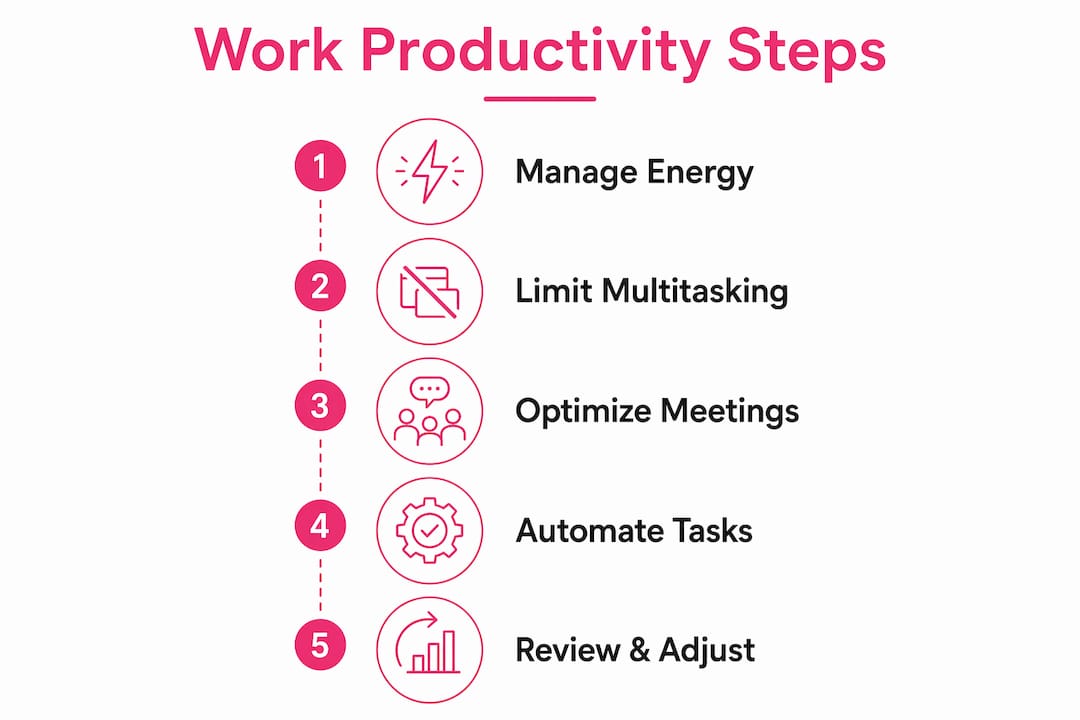
The most effective counter-strategy is the Work In Progress (WIP) limit. WIP limits cap the number of active tasks you work on at any given time. Limiting concurrent tasks to no more than two prevents the performance degradation that comes from splitting attention across multiple open loops. The rule is simple: finish before you start.
Visual workflow boards, such as those built on the Kanban method, make WIP limits practical. You create three columns: “To Do,” “In Progress,” and “Done.” The “In Progress” column has a hard cap of two items. When that column is full, you do not pull new work until you complete something. This single constraint forces prioritization and exposes bottlenecks before they become crises.
Here is how to apply WIP limits starting today:
- Audit your current task list. Count how many tasks are “in progress” right now. Most professionals discover they have six or more open loops.
- Close open loops aggressively. Pick the two most important tasks and move everything else back to “To Do.”
- Batch similar tasks together. Task batching reduces setup and transition costs and preserves working memory continuity, improving throughput by 20–30%.
- Protect your “In Progress” column. Treat new requests as additions to “To Do,” not automatic interruptions to current work.
Pro Tip: When a colleague asks you to “quickly” handle something new, add it to your “To Do” column and give them a specific time when you will address it. This protects your focus without damaging the relationship.
How can optimizing meetings and communication reclaim productive time?
Meetings are the single largest source of fragmented attention for most professionals. The average worker attends approximately 25 meetings per month. A significant portion of those meetings could be replaced with a written update that takes five minutes to read.
The key question for every recurring meeting is: does this require real-time discussion, or is it an information transfer? Status updates, progress reports, and announcements do not require live attendance. Converting 30% of your monthly meetings to asynchronous updates frees meaningful blocks of uninterrupted time for deep work. That is not a small gain. It is the difference between a day that feels reactive and one that feels controlled.
Productive meetings that do remain on the calendar need structure. Meetings without clear objectives reduce productivity for every attendee. Apply these criteria before scheduling any meeting:
- Define the objective in one sentence. If you cannot state what decision or outcome the meeting produces, cancel it.
- Share the agenda 24 hours in advance. Attendees who arrive prepared make decisions faster.
- Limit attendees to decision-makers only. Every additional person in the room adds coordination cost and dilutes accountability.
- Set a hard time limit. Fifty-minute meetings end before the next hour starts, giving attendees a buffer to reset.
- Send a written summary within one hour. This replaces the follow-up meeting that would otherwise be scheduled to recap the first one.
| Meeting type | Recommended format |
|---|---|
| Status updates | Async written update |
| Project decisions | Live meeting, 30 minutes max |
| Brainstorming | Live meeting with pre-read |
| Announcements | Email or recorded video |
| One-on-one check-ins | Async message or 15-minute call |
Transitioning meetings to async formats reduces cognitive fragmentation beyond just the time saved. Every meeting you eliminate from your calendar is also a context switch you avoid.
What role does automating routine tasks play in boosting efficiency at work?
Automation is not a technology project. It is a decision about where your cognitive resources belong. Every task you do manually that follows a predictable pattern is a task that is stealing attention from work that actually requires your judgment.
Automating repetitive tasks like weekly reports, follow-up emails, and file organization reclaims hours monthly and preserves mental energy for creative and strategic work. The professionals who improve their efficiency at work fastest are the ones who treat their own time as a finite resource worth protecting.
Common tasks that are strong candidates for automation include:
- Email scheduling and follow-ups. Most email clients support scheduled sending and template responses for recurring request types.
- Weekly report generation. If your report pulls from the same data sources every week, a simple template or connected spreadsheet eliminates the manual assembly step.
- File sorting and naming. Folder rules and naming conventions applied consistently eliminate the “where did I save that?” problem permanently.
- Meeting scheduling. Shared calendar links replace the back-and-forth email thread that consumes 10–15 minutes per meeting booked.
- Task reminders and deadline tracking. A single task management system with due dates and recurring reminders replaces the mental overhead of remembering what is due when.
The deeper principle here is system design. Output-based metrics and regular feedback cycles improve performance visibility and accountability. When you design your workflow around clear outputs rather than busy inputs, you can see exactly where time goes and where it should go instead. Improving your efficiency at work is not about doing more things. It is about doing fewer things with full attention and a clear system behind each one.
Key Takeaways
Sustainable productivity gains come from execution design: managing energy, limiting task switching, and removing structural friction from your workflow.
| Point | Details |
|---|---|
| Manage energy, not just time | Schedule demanding tasks during peak cognitive hours and routine work during energy valleys. |
| Apply WIP limits | Cap active tasks at two to prevent multitasking and preserve working memory. |
| Convert meetings to async | Replace status updates with written summaries to reclaim deep work time. |
| Automate repetitive tasks | Identify predictable manual tasks and remove them from your cognitive load. |
| Design your system first | Clear outputs and structured workflows produce more than effort or intensity alone. |
Why working harder is the wrong answer to a design problem
The most persistent myth about workplace performance is that output is a function of effort. Work longer, push harder, skip the break. That model fails because it treats the brain like a machine that runs at constant capacity. It does not.
What I have seen, both in my own work and in the research, is that the professionals who consistently outperform their peers are not the ones working the most hours. They are the ones who have designed their day to match how their brain actually functions. They protect their peak hours. They finish tasks before starting new ones. They say no to meetings that could be emails. These are not personality traits. They are decisions.
The uncomfortable truth is that most productivity problems are structural, not motivational. Productivity gains come from execution design: reducing fragmentation, minimizing context switching, and aligning autonomy with structure. If your day feels chaotic, the fix is not more discipline. The fix is a better system.
Start with one change. Pick your peak energy window and protect it for one week. Do not check email during that block. Do not take meetings. Just do the work that matters most. The results will tell you everything you need to know about where your real productivity has been hiding.
You can also support your cognitive performance from the ground up with daily resilience habits that reduce the stress load your brain carries into every workday.
— Jessica
Resources from Perks that support your productivity goals
Sustainable performance at work depends on more than workflow tactics. Your energy, focus, and mental clarity are biological assets that need active support.
Perks offers a range of science-backed books and guides covering micro-habit formation, nutrition, and physical fitness, all designed to help busy professionals build the physical and mental foundation that focused work requires. From nutrition and wellness resources that support sustained energy throughout the day to guides on beating brain fog with evidence-based daily habits, Perks connects the dots between personal wellness and professional output. When your body and mind are well-supported, the productivity strategies in this article work significantly better.
FAQ
What is the most effective way to improve productivity at work?
The most effective approach is execution design: protecting peak energy hours for demanding tasks, limiting active tasks to two at a time, and removing structural friction like unnecessary meetings. Research confirms that reducing fragmentation produces more durable gains than increasing effort or working longer hours.
How does the Pomodoro technique improve work performance?
The Pomodoro technique structures work into 25-minute focused intervals followed by 5-minute breaks, aligning with the brain’s ultradian rhythms. This prevents cognitive fatigue and maintains consistent performance across the full workday.
How many meetings should I convert to async updates?
Converting at least 30% of recurring meetings to asynchronous written updates frees significant blocks of uninterrupted time. Status reports, progress updates, and announcements are the best candidates for async format.
What is a WIP limit and why does it matter?
A Work In Progress (WIP) limit caps the number of tasks you actively work on at one time, with two being the recommended maximum. Keeping active tasks at two prevents the performance loss caused by constant task switching and open cognitive loops.
How does sleep affect productivity at work?
Sleep directly determines the quality of your peak cognitive hours the following day. Poor sleep compresses your high-performance window and makes focus blocks far less effective. Perks covers sleep optimization strategies that directly support sustained work performance.